How To Control Your Kids Screen Time

How To Control Your Kids Screen Time
As a parent in today’s modern, technology-filled society, watching over your child’s every move on a computer or phone can get difficult. We can’t watch them 24/7, nor do we really want to.
However, these young James Bonds find ways to sneak things in. The internet is a wonderful place, but it’s also a dangerous place. You can do everything you can to make sure your kids know right versus wrong, but one innocent mistake or typo could lead to a whole can of worms.
One typo….and that’s it. The next thing you know you’re giving the “talk” far too early or have to deal with a crying child when they see something they know is wrong and it’s too late.
Join: AweFilled Homeschool Connect & Christian Feminine Homemaking Chat!
Figuring out how to filter and manage your child’s screen time is often a daunting task. It’s hard to know where to even begin and every tool available to help seems too complicated.
Well, a little while ago, I heard about a game-changing product called Circle made by Disney. It’s simple and efficient and it makes watching your kids’ online moves easier than ever.

What is Circle?
Circle pairs with your WiFi connection allowing you to manage every device that’s connected – all with just an app! You can:
- Set time limits
No more begging them to get off the internet to help do chores or do their homework. The internet will turn off forcing them to log off! You can set time limits for certain apps or website, or the whole internet connection in general.
- Set bedtime
It’s super easy to set a bedtime for your child’s device. Open the app, set the times you want their internet disconnected and voila!
- Manage filters
With 4 preset filter levels (Pre-K, Kid, Teen and Adult), it’s never been easier to set filters on the internet.
- Set rewards
Did your kids make the Honor Roll or finish all of their chores early? You can set rewards such as a later bedtime or a longer time limit for a specific amount of time!
- Pause their connection
“I’ll be there in a minute” will become sitting at the table right now when you pause their connection. Open the app, hit pause and they no longer have internet. It’s easier than ever to turn their attention from their device without raising your voice and repeating yourself.
- Set off times
Schedule screen time with the off time feature. Whether you want a screen-free weekend or a screen-free night, you can easily set the times that the internet is on (or isn’t).
- Check their activity with insights
See exactly where your child has been online and for how long. It’s easier than ever to see exactly what they are doing and to have informed conversations with them about time limits!
Another amazing feature of Circle? They also have Circle Go which works for all devices on all mobile networks!

If you are headed on a road trip or out for a camping weekend and want to make sure that your kids are enjoying family and nature instead of their mobile devices, this is for you!
Not only can you set all the same limits on mobile devices, you can see insights too! And at a price of $9.95/month for up to 10 devices….you just can’t beat it!
Read: Protecting Your Tweens & Teens Online
Looking for some other great products that help with internet filters? Covenant Eyes is a great one. With Internet Accountability and Filtering, Covenant Eyes helps filter out porn without you ever having to think of it. This is great not only for kids, but for adults, too!
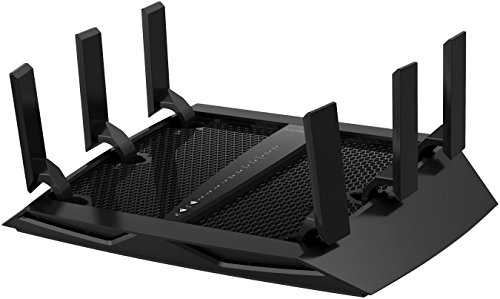
Also, this router below is found on amazon and it is AMAZING! It also allows parents to control the internet with the touch of an app! This in conjunction with Circle or Covenant Eyes are all great tools to use to safeguard your family!
NETGEAR Nighthawk X6 AC3200 Tri-Band Gigabit WiFi Router (R8000) Compatible with Amazon Echo/Alexa
In Awe,